
Set up what you track
What you track is what you log every day. You add it, edit it and put it in order under Settings, Manage what you track.
Updated

Track something new
- Go to Settings and choose Manage what you track.
- Tap the + button at the bottom right.
- Pick an Icon and type the Name.
- Choose the Kind and set its options, such as the choices of a list or the range of a scale.
- Tap Start tracking.
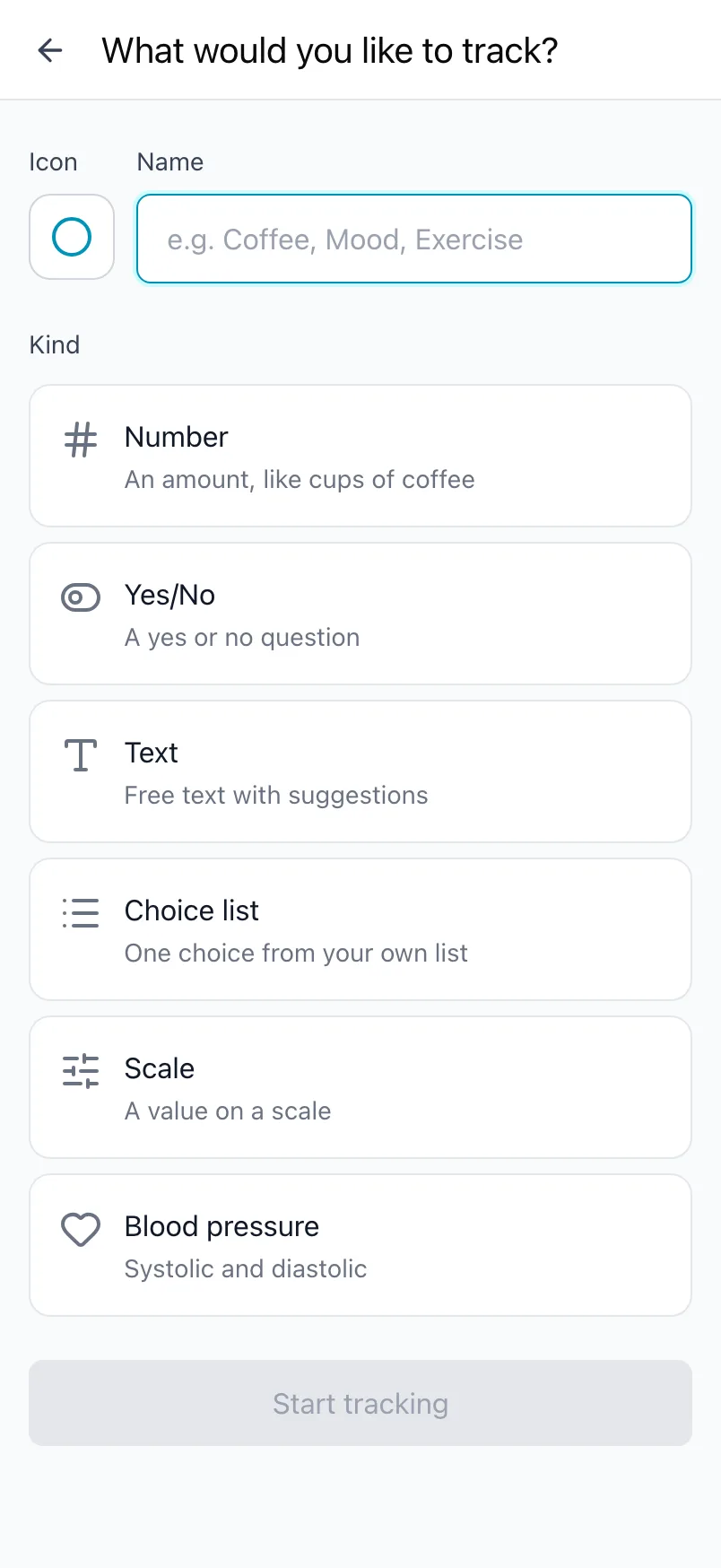
It appears on Today straight away. Not sure which kind to pick? Kinds of values explains all six with examples.
Free has room for 5 trackers. When you add a sixth, Loggr shows what Loggr Pro adds; with Pro there is no limit.
Edit a tracker
Tap a tracker in What you track to open Edit tracker. You can change the name, the icon and the options of its kind, then tap Save changes.
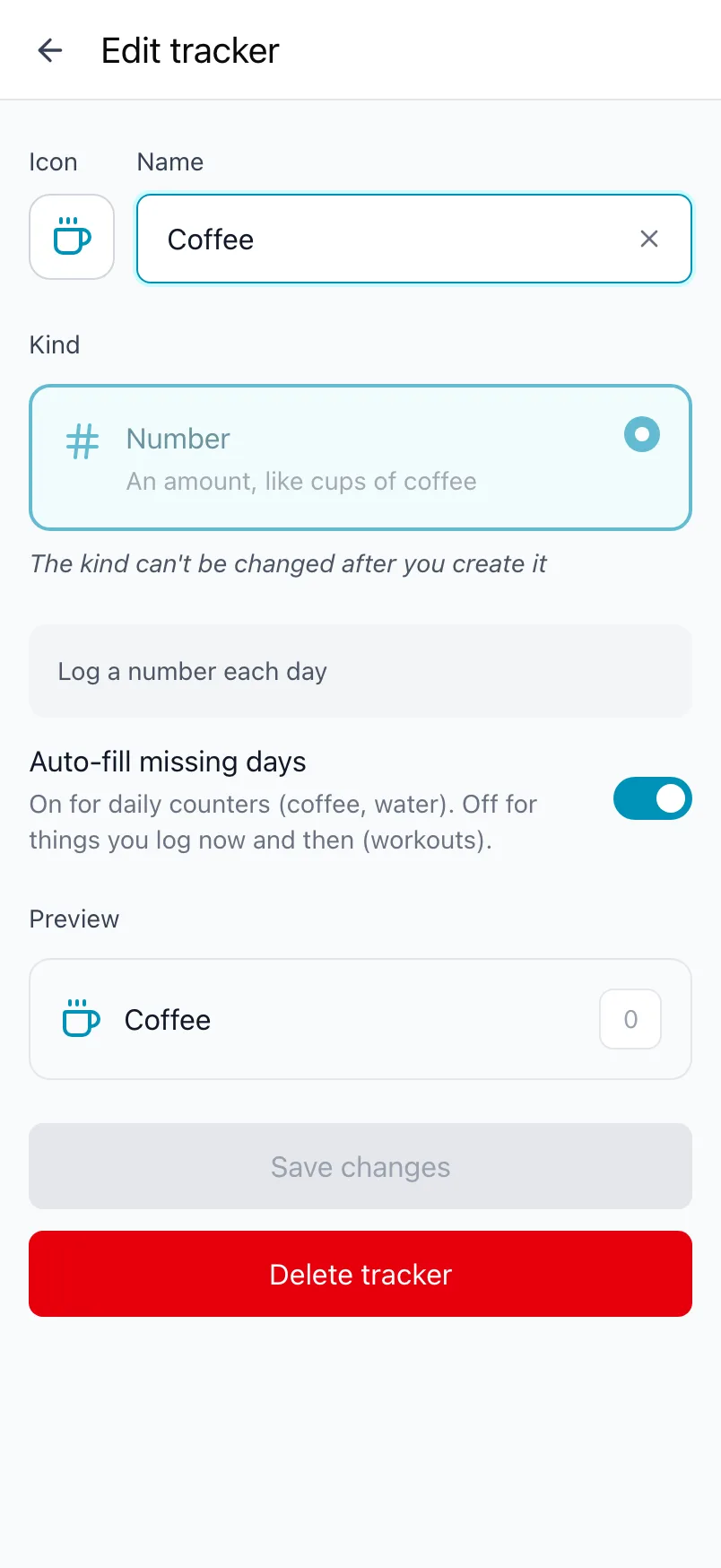
Everything you logged stays with it, also after you rename it. The Kind cannot be changed after you create it. To switch to another kind, track it again with the new kind and switch the old one off.
Change the order
Drag your trackers in What you track into the order you want. Today shows them in that order, and an export uses it for its columns.
Switch a tracker off
Each tracker in What you track has a switch. A switched-off tracker disappears from Today, Timeline and Stats, but everything you logged for it is kept. Switch it back on and it all returns.
On Free, switched-off trackers still count toward the 5.
Delete a tracker
Open the tracker and tap Delete tracker at the bottom. Loggr asks you to confirm, because this deletes the tracker and every value you ever logged for it. This cannot be undone.
Want to keep the history? Switch it off instead, or export your data first.
Frequently asked questions
What is a tracker?
A tracker is one thing you log each day, such as Sleep hours, Coffee or Headache. Each tracker has a name, an icon and a kind. The kind decides how you log it: a number you count up, a yes or no, a slider, a choice from a list, free text or a blood pressure reading.
You find everything you track under Settings, Manage what you track.
How do I start tracking something new?
Go to Settings, Manage what you track and tap the + button.
- Pick an Icon.
- Type the Name.
- Choose the Kind and set its options, such as the choices or the scale range.
- Tap Start tracking.
It appears on Today straight away. The kind cannot be changed later, so pick it with care.
Can I rename a tracker or change its kind?
You can change the name, the icon and the options of a tracker. Go to Settings, Manage what you track, tap the tracker, make the change and tap Save changes. Everything you logged stays with it, also after a new name.
The kind can't be changed after you create it. To switch to another kind, track it again with the new kind and switch the old one off or delete it.
How do I change the order of what I track?
Go to Settings, Manage what you track and drag your trackers into the order you want. Today uses the same order, and so do the columns of an export.
What is the difference between switching a tracker off and deleting it?
Switching a tracker off with its switch in What you track hides it from Today, Timeline and Stats. Everything you logged is kept, and switching it back on brings it all back.
Deleting a tracker removes it and every value you ever logged for it, for good. Loggr asks you to confirm first, because this cannot be undone.
How many trackers can I have for free?
Free has room for 5 trackers. When you add a sixth, or switch on a sixth, Loggr shows what Loggr Pro adds. With Pro you can track as much as you like.
Trackers you switch off still count toward the 5 on Free, so delete the ones you no longer need.