
August 11, 2026
Tracking Medication Adherence: A Plain Boolean Log You Can Show a Doctor
If you take a daily medication, a two-second yes/no log gives you a clean adherence record to bring to your next appointment. Here is how to set one up in Loggr without turning it into a clinical project.
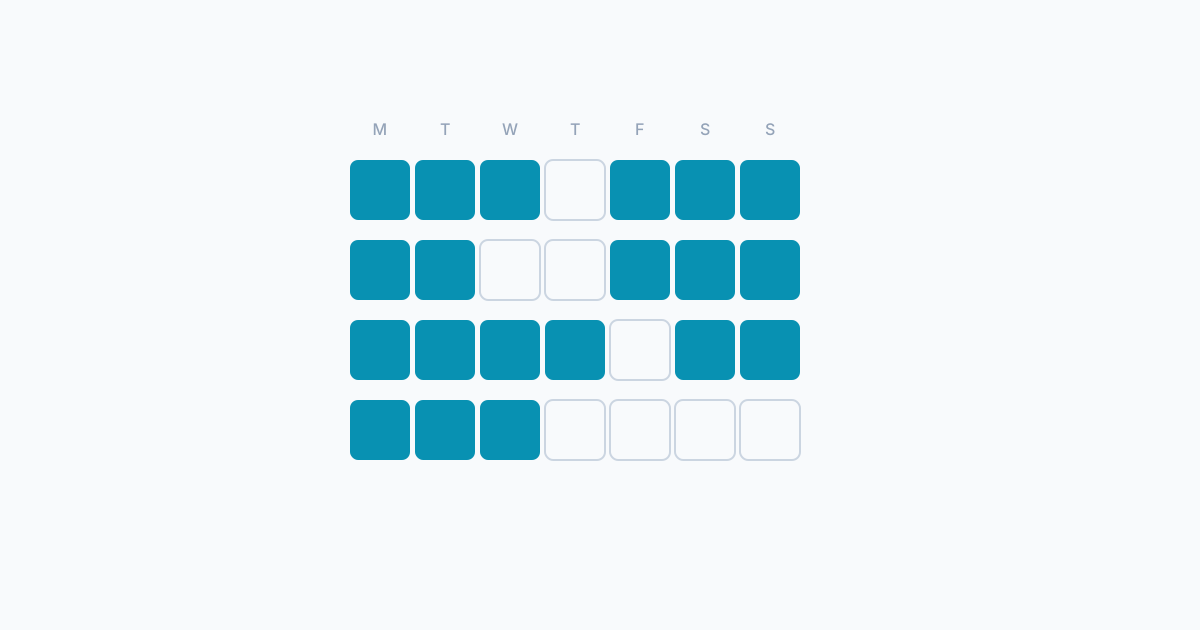
It is 11am and you cannot remember whether you took your morning pill. You can picture the bottle, the glass of water, almost the swallow itself, but you cannot say for certain. So you check the bottle, you count what is left, you try to reason backward from the date you opened the pack. Sometimes this works. Sometimes it does not, and you spend the rest of the day vaguely uneasy.
A two-second yes/no log earlier in the morning, taken at the moment you take the pill, removes that doubt entirely. Not because it makes you more disciplined. Because it gives you a record. This article is about logging whether you took your daily medications, so you can share an honest record with your doctor or pharmacist. It is not medical advice. It does not recommend medications, doses, or schedules. It is about the log itself, and nothing else.
What this article is, and what it is not
You are on a daily medication. A clinician prescribed it. You want to keep a record of whether you took each day’s dose, both to settle the “did I take it?” question for yourself and to bring honest adherence data to your next appointment. That is the only problem this article solves.
What this article will not do: tell you which medication to take, when, what dose, what to do about side effects, or what to do if anything about your situation changes. None of that is in scope. That is the work of your prescriber and your pharmacist. Loggr is the notebook. They are the readers.
The Loggr setup
Loggr has a Yes/No (Boolean) field type. It is the simplest of the six field types: a one-tap toggle that records did-it or did-not-do-it for a given day. It was built for exactly this kind of log.
There are two ways to set it up. Pick whichever fits your regimen.
One boolean per medication
If you take more than one daily medication and you want to know which one you took and which one you missed, give each medication its own boolean field.
- Open the field list, add a new field, choose Yes/No.
- Label it with the medication name (or whatever shorthand you use for it).
- Pick an icon, save.
Repeat for each daily medication. Three daily pills means three boolean fields. If your doctor asks for the adherence record on one of them specifically, you have a clean per-medication chart to bring.
One composite “took all meds today”
If your regimen is simple, say one daily pill or a single combined dose, a composite boolean is enough. One field, labelled “Took today’s meds.” One tap per day.
Most people find the per-medication setup is worth it once there is more than one daily medication, because a doctor can read a per-medication record more usefully than a single combined flag. Some start with the composite and split it later. Either path is fine.
What to take, what dose, when
What to take, what dose, when. Those are decisions made between you and your prescriber. This article is only about the log itself. None of the fields above set a schedule, recommend a dose, or interact with any pharmacy or health record system. They are toggles. Your medication routine is set by your prescriber and lives outside the app.
Logging fast, before the doubt sets in
The whole point of this setup is that it is small enough to actually do, every day, for years. If it takes a minute, you will not do it. If it takes two seconds, you might.
The single biggest factor in keeping the log alive is the trigger: the thing that already happens, that you tie the log to. A few that work:
- The pill bottle itself. Pick up bottle, take pill, tap toggle. Phone next to the bottle is the simplest version.
- Morning coffee. If your pill is a morning pill and your coffee is a morning ritual, the cup is the trigger.
- Brushing teeth. A bedtime pill pairs naturally with the toothbrush.
- A pill organiser. Opening today’s compartment is the trigger.
The reason a trigger matters is that you are not going to remember to open Loggr at a random moment. You are going to forget, exactly the way you forgot whether you took the pill. The trigger removes the remembering step.
Log immediately after taking. If you decide not to take today’s dose, log “no” immediately after that decision. Do not wait.
What this captures, and what it does not
The boolean log captures one thing: adherence. Did you take it, or did you not. It does not capture whether the medication is working, whether it is the right medication, or whether the dose is right. Those are clinical questions.
The smaller question is still useful. Adherence is one of the things a doctor regularly asks about, because medications work on the assumption that you actually take them. “How often do you miss a dose?” is a question most people answer with a guess. A four-week boolean log answers it with a number.
If you have not built any tracking practice yet, our guide on getting started with personal analytics covers the small-and-sustainable principle.
What patterns the data will show
After a few weeks, the chart and stats for your medication field will tell you a few simple things. None of these are medical interpretations. They are descriptions of your log.
Coverage percentage
Loggr’s statistics for a boolean field show how often you logged “yes” in a given week, month, or year. If you logged “yes” 26 out of 30 days in a month, that is an 87% adherence figure for that month. That number, on its own, is what most doctors actually want to know.
Day-of-week patterns
Routines break on weekends. A Sunday-skip pattern is a remarkably common shape in adherence data. So is a “Saturday morning, when I slept in” gap. The monthly view, with one tap per day, makes those patterns visible.
Trigger-loss patterns
If your adherence held steady at 95% for three months and then dropped to 70% in the fourth, something changed in your routine. Maybe you moved house and the pill bottle is in a new place. Maybe you stopped having morning coffee. The log does not tell you what changed. It tells you when the shape of your routine changed, which is enough to go and figure out the rest.
How to share the data with a doctor or pharmacist
The point of all of this is the appointment.
CSV export
Loggr offers a CSV export of all your logged data. The long-format CSV includes timestamps, field names, types, and values, one row per logged entry. That format opens in any spreadsheet program. A pharmacist or doctor can read it in a few minutes. Email it ahead, or print it and bring it in.
Screenshot of the monthly view
Often the more useful artefact is the monthly view of the boolean field. One row per day, a clear yes/no for each. Take a screenshot of the relevant month or four-week stretch. Bring it on your phone or print it out.
Most clinicians are happy with either. Ask once when they request the adherence record: “would you prefer a spreadsheet or a screenshot?” Then bring whichever they ask for.
How much to bring
Bring whatever stretch your clinician asked for. Four weeks is a common baseline for a new conversation. Eight to twelve weeks is common if you are being managed for an ongoing condition. If they did not specify, bring four weeks and ask whether they want more. Four weeks is enough to show coverage and day-of-week patterns.
For context on what to log alongside, our guide to what to track when you start walks through choosing a small initial set without over-engineering.
What you should not do with this log
Be explicit, because this is where people get in trouble.
You should not skip a dose based on the log. “I have taken it 28 days in a row, so I can probably skip today” is not a decision that comes from the chart. Talk to your clinician about whether and when to change anything, not to your app.
You should not change the dose based on the log. Dose changes are clinical decisions. The log is a record of what you did, not a recommendation for what to do next.
You should not use the log to diagnose anything. If you are noticing something new in how you feel, that conversation belongs in a clinical visit. The boolean field tracks one thing. It is not a symptom-checker.
You should not trust the log over your own memory if there is a discrepancy with the pill count. If your bottle says you should have 14 pills left and you have 12, two are missing. The pill count is authoritative for “how many doses am I behind.” The log is useful for trends and patterns over weeks. They serve different purposes.
Honest reality: most people miss doses
The published adherence research regularly puts long-term adherence to chronic-condition medications somewhere around 50% to 80%. Perfect adherence is rare. None of that is failure. It is the baseline.
The reason the log is worth keeping is not so that you can hit 100%. It is so that you can see what your actual number is and have an honest conversation with your prescriber about it. A doctor who knows your real adherence is in a better position to help than one working from your best guess.
FAQ
What if I missed a dose?
Log it honestly as “no” for that day, and ask your pharmacist or your prescriber what to do about the missed dose itself. They will have a clear answer for your specific medication. Loggr’s role is to record what happened. Their role is to advise on what to do next. Do not skip the log entry to make the chart look better; the chart is for honest conversation, not appearance.
Should I track side effects too?
A text field for context can be useful, but be careful with framing. Use it to write a short, factual note (“felt nauseous after breakfast”), not to diagnose anything. The point of a context note is to give your clinician a starting point for a conversation. If something feels meaningfully different, that conversation belongs with a clinician, not with an app or an internet search.
Multiple medications, multiple times a day. How?
One boolean field per dose. If you take pill A at 8am and pill B at 9pm, that is two booleans. If you take three pills in the morning together, that can be one boolean (“morning meds”) as long as you actually take them as a set. Each toggle is a one-second tap. The consistency over months is what makes the data useful at the appointment.
Can I share this with my pharmacist as well as my doctor?
Yes. Pharmacists often have more to say about adherence than people expect, especially around timing and routine. CSV export or a monthly-view screenshot works the same way for them. If you are picking up a refill and your pharmacist asks how things are going, the screenshot is a faster honest answer than trying to remember.
What if I forget to log even though I took the pill?
Loggr lets you log past dates from the date picker on the Today screen. Tap back to yesterday and tap the toggle. Backfilling within a day or two when you actually remember is fine. Avoid backfilling a whole week from memory; at that point you are guessing, and a guess in the log is worse than a gap.
Does Loggr remind me to take the medication?
Loggr can send a daily reminder at a time of your choosing, on the days you choose. The reminder is to log, not a clinical alarm. If you need a hard medication reminder because missing a dose has real consequences for you, a dedicated medication-reminder app or a pillbox alarm is purpose-built for that, and your pharmacist can advise. Loggr is the logbook.
Key takeaways
- Loggr’s Yes/No field type gives you a one-tap daily adherence log. One boolean per medication, or one composite “took today’s meds” boolean, depending on your regimen.
- The log captures whether you took the dose, nothing more. Whether the dose itself is right is a medical question, not a Loggr question.
- Tie the log to a trigger that already happens (pill bottle, morning coffee, toothbrush, pill organiser) so it survives a busy week.
- Share the data with your doctor or pharmacist as a CSV export or a screenshot of the monthly view. Four weeks is a fair default; bring whatever stretch your clinician asked for.
- Do not skip, change, or stop a dose based on what you see in the chart. Those decisions belong with a prescriber. The log informs the conversation; it does not replace it.
Set up the boolean tonight, log tomorrow morning
If you take a daily medication, the smallest useful first step is to add a boolean field for it before you go to bed, so the toggle is ready next to the bottle in the morning. Open Loggr, add a Yes/No field, label it with your medication name, and the setup part is done. Tomorrow morning, after you take the pill, tap the toggle. Repeat the day after. Repeat the day after that.
Four weeks in, you will have a clean adherence record. Bring it to your next appointment. What the number means, and what (if anything) to change about your regimen because of it, is the work of your prescriber. The honest log is the part you can hand them, and it is worth more than a guess.
If you also track blood pressure or other vitals at home, our blood pressure tracking guide follows the same share-with-your-doctor principle.